Walk into any self-managed Kubernetes cluster and sooner or later you end up staring at /etc/kubernetes/pki, wondering which certificate belongs to which component and why the API server seems to need so many of them.
That confusion is normal.
Kubernetes certificate management looks complicated at first because multiple components talk to each other in different directions, and TLS identity changes depending on who is acting as the client and who is acting as the server.
This article gives you the mental model that makes it click. We will cover the main certificate authorities, the certificates needed when provisioning a cluster from scratch, how those certificates are used between components, and the commands you can use to inspect and manage them.
The simple mental model
The easiest way to think about Kubernetes certificates is this:
Important
If a component receives HTTPS traffic, it needs a server certificate.
If a component initiates a connection, it may need a client certificate.
Some components do both.
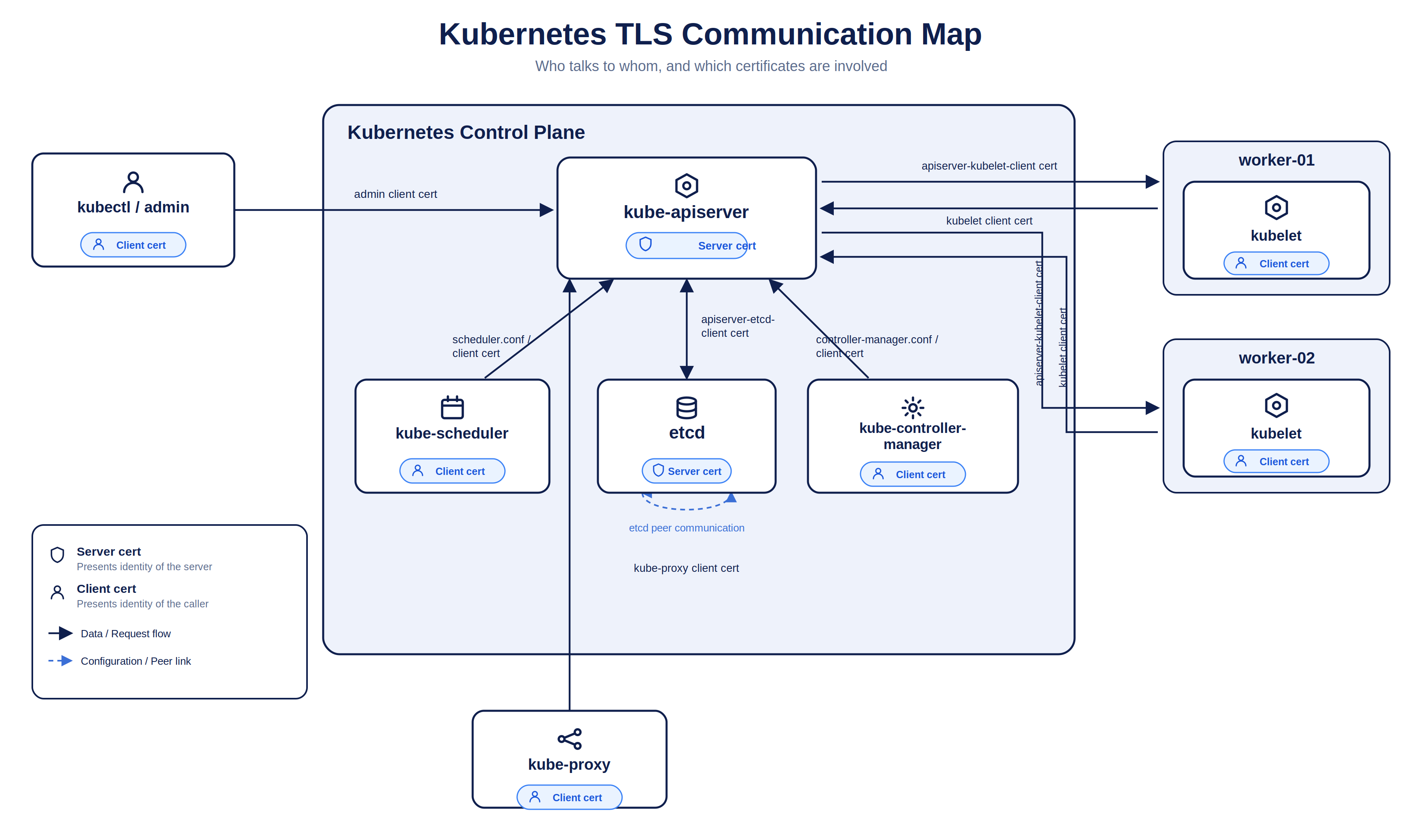
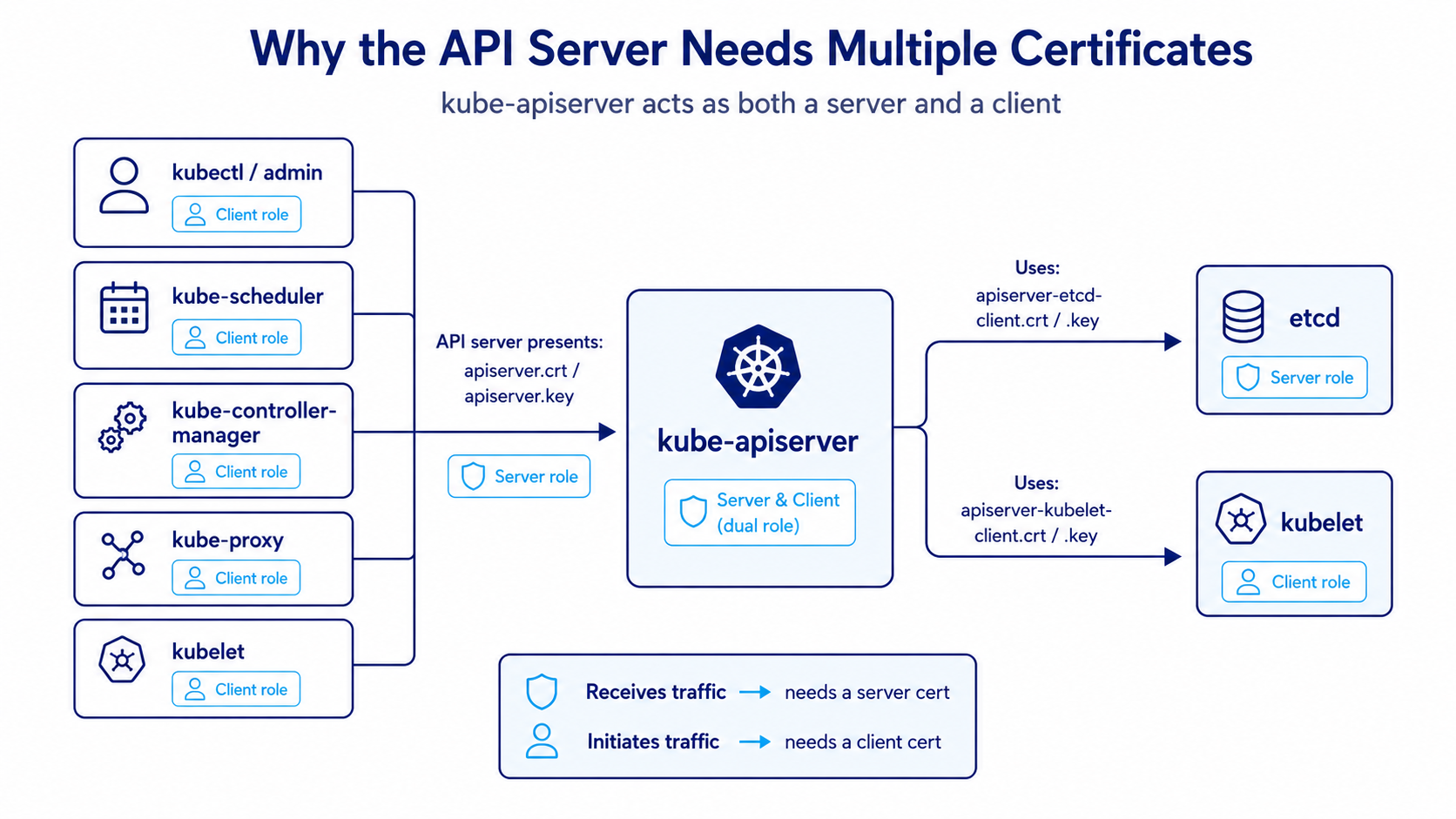
The best example is kube-apiserver:
- it acts as a server when
kubectl, kubelet, scheduler, and controller manager connect to it - it acts as a client when it connects to etcd
- it also acts as a client when it connects back to the kubelet
That is why the API server needs more than one certificate pair.
TLS, PKI, and identity in Kubernetes
Kubernetes uses TLS for two main reasons:
- Encryption — traffic is protected in transit
- Identity verification — each side can prove who it is
Kubernetes commonly uses X.509 certificates.
.crt = public certificate
.key = private key
The certificate is public identity.
The private key proves ownership of that identity.
The most sensitive key in the cluster is the CA private key, because that key can sign new trusted certificates.
In mutual TLS, both sides can authenticate each other:
- the server presents a server certificate
- the client may also present a client certificate
- each side validates the certificate chain against a trusted CA
Kubernetes then separates authentication from authorization:
TLS certificate proves identity
RBAC decides permission
For client certificate authentication, the certificate subject becomes important:
CN = Kubernetes username
O  = Kubernetes group
For example:
CN=system:node:worker-01
O=system:nodes
That is how a kubelet identifies itself to the API server.
The certificate authorities in a Kubernetes cluster
In a kubeadm-style cluster, PKI files are typically stored under:
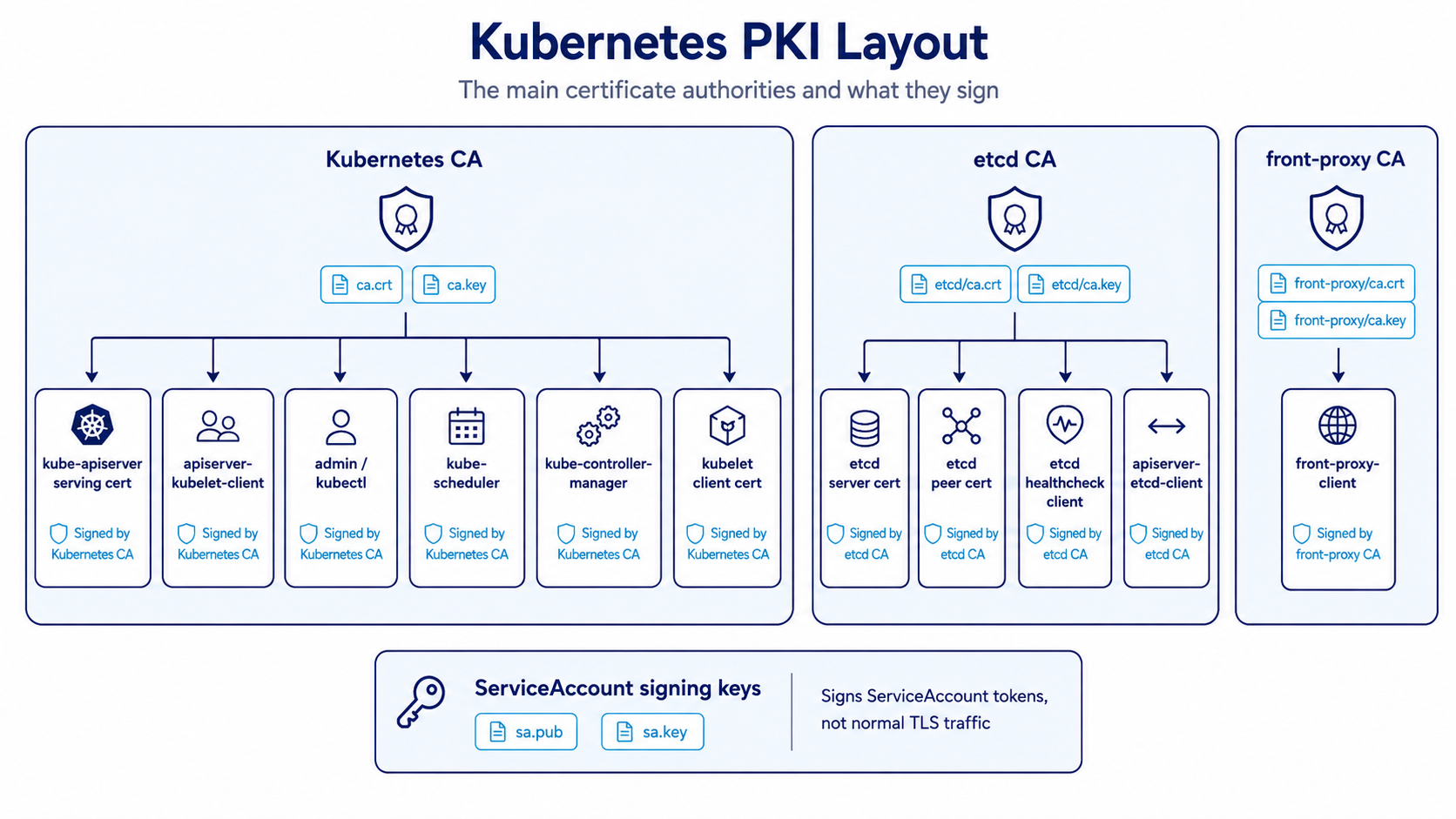
/etc/kubernetes/pkiThe main certificate authorities and signing keys are:
| CA / Key Pair | Purpose |
|---|---|
ca.crt, ca.key | Main Kubernetes CA. Signs most Kubernetes component certificates. |
etcd/ca.crt, etcd/ca.key | Dedicated etcd CA. Signs etcd server, peer, and etcd client certificates. |
front-proxy-ca.crt, front-proxy-ca.key | Used by the API aggregation layer. |
sa.pub, sa.key | Signs ServiceAccount tokens. Not normal TLS traffic. |
Note
The ServiceAccount signing key pair is usually stored with the cluster PKI, but it is not a normal TLS certificate pair. It signs and verifies ServiceAccount tokens.
What certificates do you need when provisioning a cluster from scratch?
If you are provisioning a control plane from scratch, these are the main certificate areas you need to account for.
1. Kubernetes CA
This is the root of trust for normal Kubernetes component certificates.
It signs certificates used by:
kube-apiserverkube-schedulerkube-controller-manager- admin access
- kubelet client identity
- API server to kubelet client identity
2. etcd CA
This CA is used only for etcd-related trust.
It signs:
- etcd server certificate
- etcd peer certificate
- etcd healthcheck client certificate
- API server to etcd client certificate
3. front-proxy CA
This CA is dedicated to the Kubernetes API aggregation layer (used by extension API servers like metrics-server or custom API services).
It signs:
front-proxy-client.crt,front-proxy-client.key— used bykube-apiserverwhen it acts as an authenticating proxy to extension API servers
Here is the flow that explains why it needs its own CA:
kubectlsends a request for an aggregated API (e.g.kubectl top nodes→metrics.k8s.io).kube-apiserverterminates the user’s connection and authenticates them (via OIDC, client cert, token, etc.).kube-apiserverthen proxies the request to the extension API server (metrics-server) using mTLS withfront-proxy-client.crtandfront-proxy-client.key.kube-apiserverinjects HTTP headers telling the extension API server who the original user was:X-Remote-User: <username>X-Remote-Group: <groups>X-Remote-Extra-<name>: <extra>
- The extension API server uses
--requestheader-client-ca-file(front-proxy-ca.crt) to verify that the request came from a trusted API server proxy, and then trusts thoseX-Remote-*headers for authorization.
client -> kube-apiserver -> extension API server (e.g. metrics-server)
          [authenticates user]   [validates proxy via front-proxy-ca]
4. ServiceAccount signing keys
These are used to sign ServiceAccount tokens and are logically separate from component TLS.
Core component certificates
kube-apiserver
The API server is the center of the cluster. Almost every major component talks to it.
As a server, it needs:
apiserver.crt
apiserver.key
This is the certificate presented when clients connect to the Kubernetes API.
That certificate must include correct Subject Alternative Names.
Common SANs include:
kubernetes
kubernetes.default
kubernetes.default.svc
kubernetes.default.svc.cluster.local
10.96.0.1                             # Kubernetes Service ClusterIP (first IP in serviceSubnet)
control-plane hostname
control-plane IP
load balancer DNS/IP (if configured)
127.0.0.1
Tip
In-cluster pods talk to the API server via the
kubernetesService (https://kubernetes.default.svcor directly tohttps://10.96.0.1:443). If10.96.0.1(or your custom service subnet’s first IP) is missing from the SANs, in-cluster clients will fail TLS certificate verification.
As a client, the API server also needs additional certificates.
To connect to etcd:
apiserver-etcd-client.crt
apiserver-etcd-client.key
To connect to kubelet:
apiserver-kubelet-client.crt
apiserver-kubelet-client.key
To connect to aggregated/extension API servers:
front-proxy-client.crt
front-proxy-client.key
That is the piece many people miss: the API server is not only a server. It is also a client in three distinct directions.
etcd
etcd stores cluster state, so its certificate layout matters a lot.
It commonly needs these certificate sets.
For serving client traffic:
etcd/server.crt
etcd/server.key
For peer-to-peer communication between etcd members:
etcd/peer.crt
etcd/peer.key
For health checks:
etcd/healthcheck-client.crt
etcd/healthcheck-client.key
The API server does not connect anonymously to etcd.
It uses apiserver-etcd-client.crt and apiserver-etcd-client.key, signed by the etcd CA.
kubelet
The kubelet also works in both directions.
When the kubelet talks to the API server, it uses a client certificate:
/var/lib/kubelet/pki/kubelet-client-current.pemThis usually identifies the node as something like:
CN=system:node:<node-name>
O=system:nodes
When the API server talks back to the kubelet for operations like logs, exec, attach, port-forward, or metrics, the kubelet acts as a server.
For that, it needs:
/var/lib/kubelet/pki/kubelet.crt
/var/lib/kubelet/pki/kubelet.key
A good memory hook:
kubelet client cert = kubelet -> API server
kubelet server cert = API server -> kubelet
Warning
In most default
kubeadmsetups,/var/lib/kubelet/pki/kubelet.crtis a self-signed certificate generated locally on the node—it is not signed by the cluster CA! This is the root cause behind common TLS errors when tools likemetrics-serverorkube-apiserverconnect to kubelet. See the Gotchas section below for how to fix this withserverTLSBootstrap.
admin, scheduler, controller manager, and kube-proxy
These mostly act as clients to the API server.
| Component | Credential | Purpose |
|---|---|---|
| admin / kubectl | admin.conf | Administrative access to the API server |
| kube-scheduler | scheduler.conf | Scheduler communicates with the API server |
| kube-controller-manager | controller-manager.conf | Controller manager communicates with the API server |
| kube-proxy | kube-proxy.conf | Watches cluster state through the API server |
Tip
Scheduler and controller manager do not normally talk directly to etcd.
They go through the API server.
Full communication map
The communication flow looks like this conceptually:
kubectl/admin -> kube-apiserver
kube-scheduler -> kube-apiserver
kube-controller-manager -> kube-apiserver
kube-proxy -> kube-apiserver
kubelet -> kube-apiserver

kube-apiserver -> etcd
kube-apiserver -> kubelet

etcd member -> etcd member
If you understand that direction map, certificate mapping becomes much easier.
How to think about any Kubernetes certificate
Do not start by memorizing filenames.
Start with the communication path and ask four questions:
- Who is calling whom?
- Who is the server?
- Who is the client?
- Which CA should be trusted?
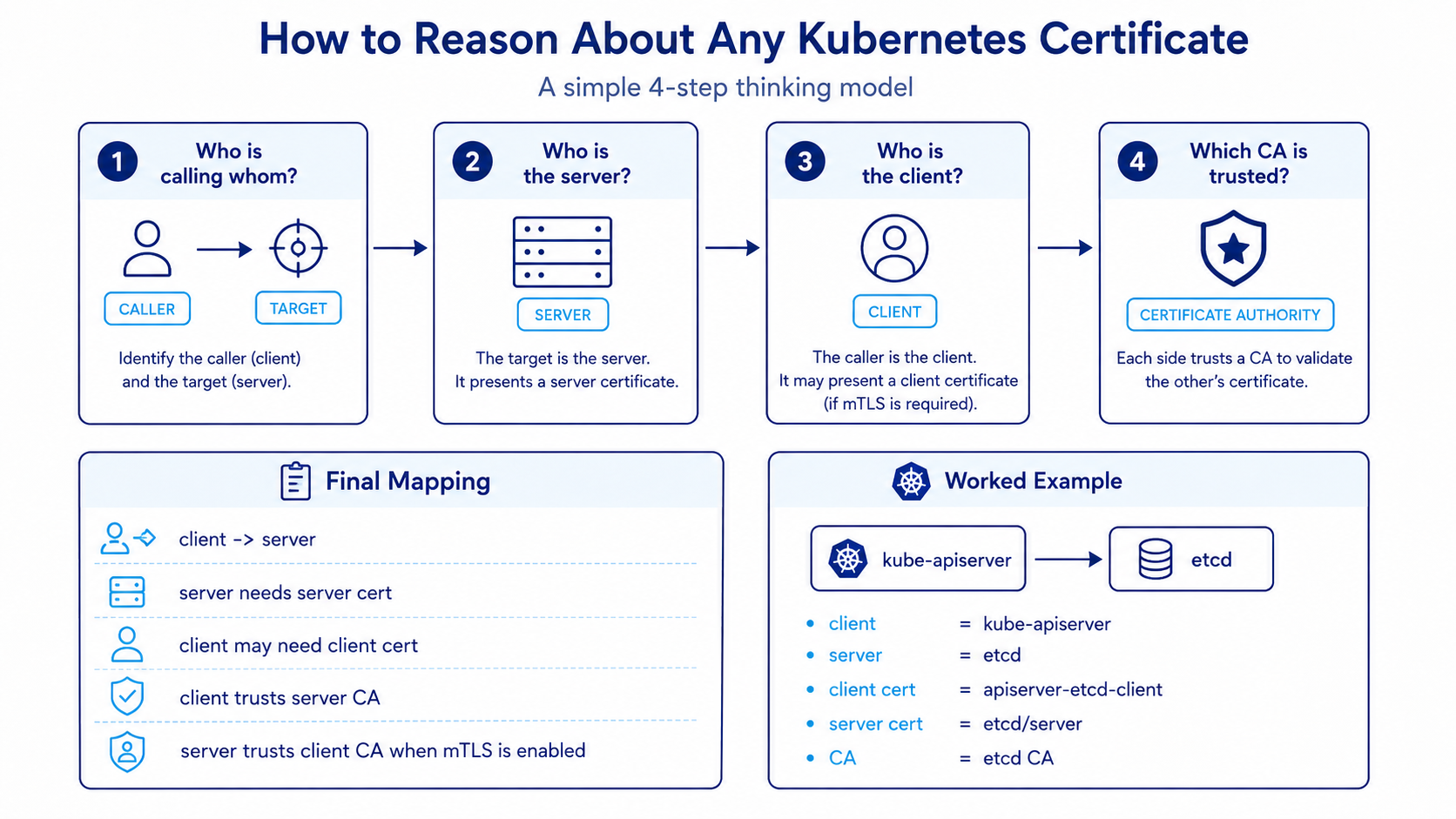
Then map it like this:
client -> server
server needs server cert
client may need client cert
client must trust server CA
server must trust client CA if mTLS is enabled
Example:
kube-apiserver -> etcd
client = kube-apiserver
server = etcd
client cert = apiserver-etcd-client.crt/key
server cert = etcd/server.crt/key
CA = etcd CA
Another example:
kubelet -> kube-apiserver
client = kubelet
server = kube-apiserver
client cert = kubelet-client-current.pem
server cert = apiserver.crt/key
CA = Kubernetes CA
Important
This direction-first method is far more reliable than trying to memorize random filenames in isolation.
Practical commands to inspect certificates
When working with cluster certificates, these are the most useful inspection commands.
Check expiration of kubeadm-managed certs:
kubeadm certs check-expirationInspect a certificate in full:
openssl x509 -in /etc/kubernetes/pki/apiserver.crt -text -nooutCheck only expiry:
openssl x509 -in /etc/kubernetes/pki/apiserver.crt -noout -enddateCheck issuer:
openssl x509 -in /etc/kubernetes/pki/apiserver.crt -noout -issuerCheck subject:
openssl x509 -in /etc/kubernetes/pki/apiserver.crt -noout -subjectCheck SANs:
openssl x509 -in /etc/kubernetes/pki/apiserver.crt -text -noout | grep -A1 "Subject Alternative Name"Inspect the kubelet client certificate:
openssl x509 -in /var/lib/kubelet/pki/kubelet-client-current.pem -text -nooutList kubelet PKI files:
ls -l /var/lib/kubelet/pki/kubeadm commands for generation and renewal
If you are using kubeadm, these commands matter the most.
Generate all certificates during initialization:
kubeadm init phase certs allGenerate only the API server certificate:
kubeadm init phase certs apiserverGenerate the API server client certificate for kubelet communication:
kubeadm init phase certs apiserver-kubelet-clientGenerate etcd-related certificates:
kubeadm init phase certs etcd-server
kubeadm init phase certs etcd-peer
kubeadm init phase certs etcd-healthcheck-client
kubeadm init phase certs apiserver-etcd-client
Renew all kubeadm-managed certificates:
kubeadm certs renew allRenew specific certificates:
kubeadm certs renew apiserver
kubeadm certs renew apiserver-kubelet-client
kubeadm certs renew apiserver-etcd-client
Generate kubeconfig files:
kubeadm init phase kubeconfig admin
kubeadm init phase kubeconfig scheduler
kubeadm init phase kubeconfig controller-manager
Static pod manifests and certificate flags
In kubeadm clusters, control plane components usually run as static pods.
Their manifests are typically stored in:
/etc/kubernetes/manifests/Important files:
/etc/kubernetes/manifests/kube-apiserver.yaml
/etc/kubernetes/manifests/etcd.yaml
/etc/kubernetes/manifests/kube-scheduler.yaml
/etc/kubernetes/manifests/kube-controller-manager.yaml
Useful API server flags:
--client-ca-file
--tls-cert-file
--tls-private-key-file
--etcd-cafile
--etcd-certfile
--etcd-keyfile
--kubelet-client-certificate
--kubelet-client-key
--requestheader-client-ca-file
--proxy-client-cert-file
--proxy-client-key-file
--service-account-key-file
--service-account-signing-key-file
Useful etcd flags:
--cert-file
--key-file
--client-cert-auth
--trusted-ca-file
--peer-cert-file
--peer-key-file
--peer-client-cert-auth
--peer-trusted-ca-file
Tip
If you are ever unsure which certificate a component is actually using, check the static pod manifest flags first. They tell the truth.
Common gotchas
1. Missing SANs on the API server certificate (including 10.96.0.1)
If the API server certificate does not contain the right DNS names or IPs, clients will fail TLS validation (x509: certificate is valid for ..., not ...).
This often happens when:
- the control plane endpoint IP/DNS changes or a load balancer is added later
- in-cluster pods connect via
10.96.0.1(the defaultkubernetesService ClusterIP), but the certificate SAN list omitted it - the cluster was initialized without specifying
--apiserver-cert-extra-sans
To fix an existing cluster, regenerate the API server certificate with extra SANs:
kubeadm init phase certs apiserver --apiserver-cert-extra-sans "api.k8s.example.com,192.168.1.100"2. The self-signed kubelet serving certificate (the #1 metrics-server error)
By default, kubeadm provisions kubelet client certificates via the cluster CA, but leaves /var/lib/kubelet/pki/kubelet.crt as a self-signed certificate generated locally on each node.
When kube-apiserver (for kubectl logs/exec) or metrics-server connects to kubelet on port 10250 with TLS validation, you get:
x509: cannot validate certificate for <node-ip> because it doesn't contain any IP SANs
# or
x509: certificate signed by unknown authority
The common temporary hack is to pass --kubelet-insecure-tls to metrics-server, but the proper production fix is:
- Enable
serverTLSBootstrap: truein theKubeletConfiguration(or via kubeadm config):apiVersion: kubelet.config.k8s.io/v1beta1 kind: KubeletConfiguration serverTLSBootstrap: true - When the kubelet starts, it requests a serving certificate via the
certificates.k8s.ioAPI. - The catch: While kubelet client CSRs are automatically approved by
kube-controller-manager, kubelet serving CSRs are not auto-approved by default for security reasons (to prevent compromised nodes from spoofing arbitrary IPs). You must manually approve them:kubectl get csr kubectl certificate approve <csr-name>
3. Confusing ServiceAccount keys with TLS certs
sa.key and sa.pub are asymmetric RSA/ECDSA signing keys, not X.509 TLS certificates.
They sign and verify JWT tokens injected into pods at /var/run/secrets/kubernetes.io/serviceaccount/token. They do not secure HTTPS transport between cluster components.
4. Mixing the Kubernetes CA and etcd CA
This is the classic multi-node etcd mistake.
- Kubernetes component communication (apiserver, kubelet, scheduler, controller manager) is signed by
/etc/kubernetes/pki/ca.crt - etcd cluster communication and API-server-to-etcd client traffic is signed by
/etc/kubernetes/pki/etcd/ca.crt
If you try to pass ca.crt instead of etcd/ca.crt to --etcd-cafile, kube-apiserver will immediately fail to start with remote error: tls: bad certificate.
Summary
Kubernetes certificate management becomes much easier once you stop treating it as a list of filenames and start treating it as a set of communication paths.
The main ideas are:
- Kubernetes uses PKI and X.509 certificates for encryption and identity
- the main Kubernetes CA signs normal control plane and client certificates
- the etcd CA signs etcd-related certificates
- the API server needs both a serving certificate and multiple client certificates
- kubelet also has both a client identity and a serving identity
- the cleanest way to reason about any certificate is to identify the client, the server, and the trusted CA
If you can answer those three things for a connection path, most Kubernetes TLS questions become straightforward.