How to give every application team secure, self-service CI/CD compute on AWS — without giving up control.
The Problem Nobody Talks About Until It’s Too Late
Walk into most large enterprises running GitHub Actions at scale, and you’ll find the same story playing out in different costumes. One team spun up self-hosted runners on a few EC2 instances two years ago because the hosted runners were too slow for their Docker builds. Another team copied that approach but used a different AMI, different IAM permissions, and a personal access token that’s tied to an engineer who left six months ago. A third team is still on GitHub-hosted runners because nobody told them self-hosted was an option, and they’re paying a fortune in build minutes for workflows that need fifteen minutes of compute and ten minutes of warm-up time.
None of this is anyone’s fault. It’s what happens when infrastructure capability outpaces platform governance. Self-hosted runners are powerful — they give you VPC access, custom hardware, and control over your build environment — but without a deliberate platform strategy, “self-hosted” quietly becomes “self-managed,” and self-managed at scale becomes a security and operational liability that nobody signed up for.
This article lays out a different path: treating GitHub Actions runners as a platform service, built once by a central platform engineering team, consumed by every application team through a simple, well-governed contract. The technology underpinning it is the Actions Runner Controller (ARC) running on Amazon EKS. The discipline underpinning it is everything else in this article.
Why Centralize Runners At All?
Because the alternative doesn’t actually save anyone time — it just hides the cost. When every team manages its own runners, the total engineering hours spent on runner infrastructure across the organization is almost always higher than what a platform team would spend building it once.
Because security posture becomes unenforceable at scale. If Team A uses a personal access token and Team B uses a properly scoped GitHub App, you don’t have a security policy — you have a security suggestion.
Because shared infrastructure means shared elasticity. A platform-level runner pool can absorb burst demand from multiple teams far more efficiently than a dozen siloed pools, each sized for their own worst case.
Three Non-Negotiable Principles
Strip away all the YAML and infrastructure-as-code, and the platform rests on three principles that are not debatable.
Every runner is ephemeral. No runner pod lives longer than the single job it was created for. The moment a job finishes, the pod is destroyed. This eliminates an entire category of security problems — there’s no “the runner from last week’s job might still have secrets cached” because there is no runner from last week.
No runner ever holds a long-lived credential. Not a GitHub token, not an AWS access key. Every credential is generated at job start and expires shortly after. GitHub auth runs through a GitHub App that issues short-lived installation tokens. AWS auth runs through IRSA.
Every container image comes from one place. Not Docker Hub, not GitHub’s registry, not any public source — your enterprise’s own image registry. If an image isn’t in that registry, it cannot run on the platform.
How It Actually Works: The Pull-Based Model
The key architectural insight in ARC is that GitHub never pushes into your infrastructure — your infrastructure pulls from GitHub. This is the opposite of a webhook model, and the security implications are significant.
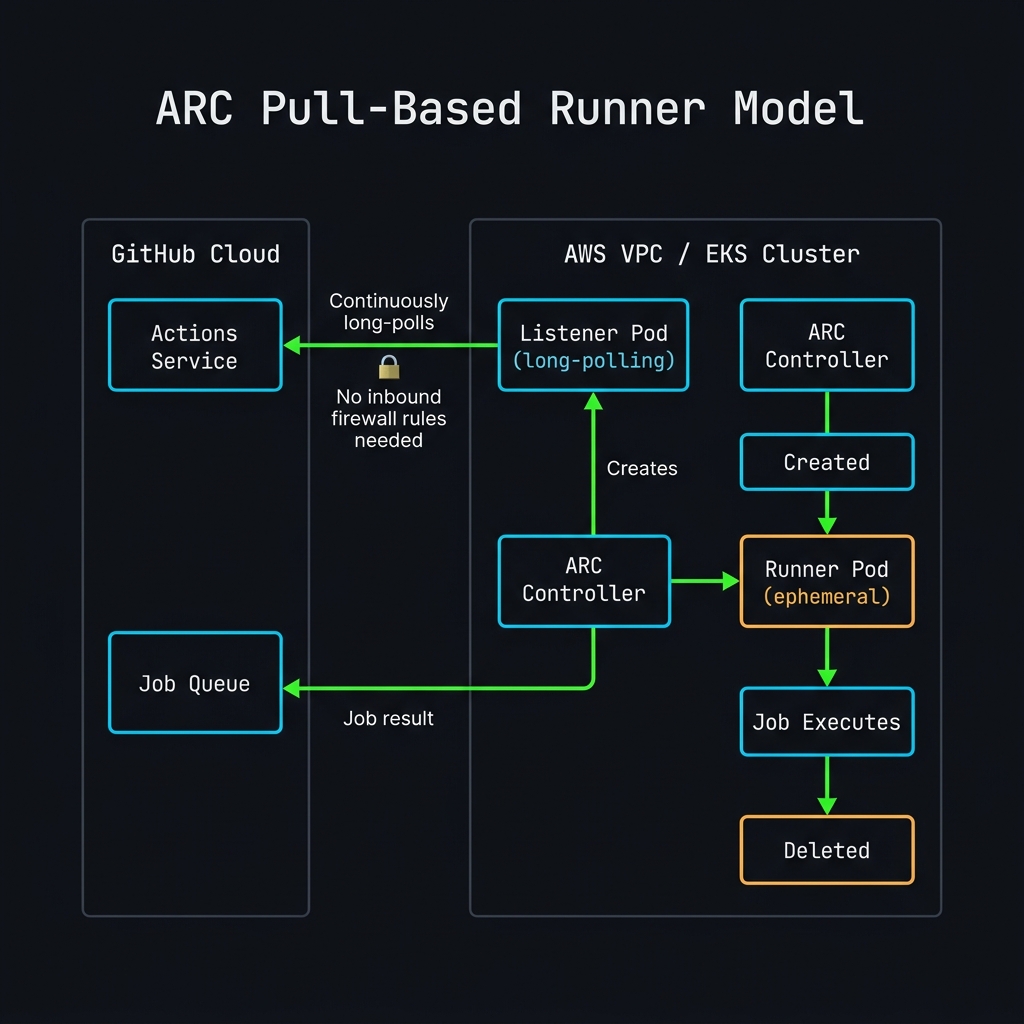
Here’s the flow step by step:
- A developer pushes a commit. GitHub’s Actions service evaluates the workflow, sees a
runs-onlabel pointing at a self-hosted runner group, and queues the job. - A Listener Pod inside your EKS cluster — a small, always-on component — has been long-polling GitHub’s Actions API. It picks up the job assignment.
- The Listener notifies the ARC Controller, which creates a Runner Pod in the appropriate team namespace.
- The Runner Pod pulls its image from Harbor, executes the job, reports the result to GitHub, and is deleted.
The runner’s entire lifespan might be ninety seconds. It never existed before the job and doesn’t exist after.
This pull-based model has a concrete security benefit: GitHub never needs inbound access to your VPC. There’s no webhook endpoint to expose, no inbound firewall rule to manage. The entire trust relationship runs outward, from inside your network to GitHub’s API.
Installing ARC with Helm
# Add the ARC Helm repository
helm repo add actions-runner-controller \
  https://actions-runner-controller.github.io/actions-runner-controller
helm repo update

# Install the controller into its own namespace
helm install arc \
  --namespace arc-systems \
  --create-namespace \
  actions-runner-controller/gha-runner-scale-set-controller \
  --version 0.9.3 \
  -f arc-controller-values.yaml
# arc-controller-values.yaml
replicaCount: 2
image:
repository: harbor.internal.company.com/arc/gha-runner-scale-set-controller
tag: 0.9.3
serviceAccount:
annotations:
eks.amazonaws.com/role-arn: arn:aws:iam::123456789012:role/arc-controller-role
metrics:
controllerManagerAddr: ":8080"
listenerAddr: ":8080"
listenerEndpoint: "/metrics"Deploying a Runner Scale Set per Team
# Deploy a scale set for team-alpha
helm install arc-runner-team-alpha \
  --namespace team-alpha \
  --create-namespace \
  actions-runner-controller/gha-runner-scale-set \
  --version 0.9.3 \
  -f team-alpha-scaleset.yaml
# team-alpha-scaleset.yaml
githubConfigUrl: "https://github.com/orgs/my-org/actions/runner-groups/team-alpha"
githubConfigSecret: arc-team-alpha-github-secret
minRunners: 0
maxRunners: 20
template:
spec:
serviceAccountName: team-alpha-runner-sa
containers:
- name: runner
image: harbor.internal.company.com/runners/ubuntu-runner:22.04-v3.2.1
resources:
requests:
cpu: "1"
memory: "2Gi"
limits:
cpu: "4"
memory: "8Gi"
securityContext:
runAsNonRoot: true
runAsUser: 1001
allowPrivilegeEscalation: false
readOnlyRootFilesystem: false
nodeSelector:
role: arc-runners
tolerations:
- key: "arc-runners"
operator: "Equal"
value: "true"
effect: "NoSchedule"The Trust Chain: IRSA Two Hops, Not One
The part of this architecture that trips people up most often is AWS access — specifically, how a Kubernetes pod ends up with permission to deploy infrastructure into a completely separate AWS account.
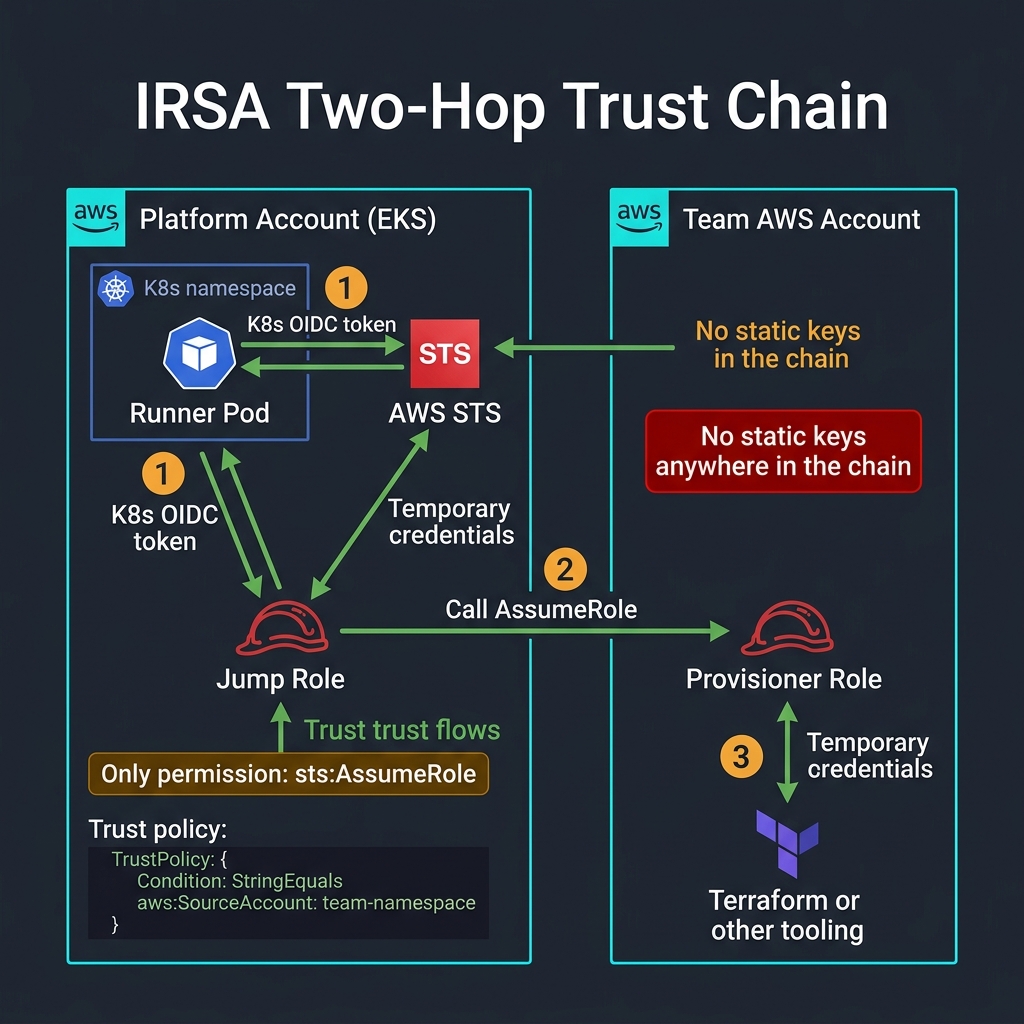
The two-hop chain keeps the blast radius of any single credential compromise contained to one team's account — never the whole org.
Hop 1: Pod Identity → Jump Role (same account as EKS)
The runner pod runs under a specific Kubernetes ServiceAccount annotated with an IAM role ARN. Through IRSA, the pod exchanges a cluster-issued OIDC token for temporary credentials for the Jump Role.
{
  "Version": "2012-10-17",
  "Statement": [
    {
      "Effect": "Allow",
      "Principal": {
        "Federated": "arn:aws:iam::PLATFORM_ACCOUNT:oidc-provider/oidc.eks.us-east-1.amazonaws.com/id/CLUSTER_ID"
      },
      "Action": "sts:AssumeRoleWithWebIdentity",
      "Condition": {
        "StringEquals": {
          "oidc.eks.us-east-1.amazonaws.com/id/CLUSTER_ID:sub":
            "system:serviceaccount:team-alpha:team-alpha-runner-sa",
          "oidc.eks.us-east-1.amazonaws.com/id/CLUSTER_ID:aud": "sts.amazonaws.com"
        }
      }
    }
  ]
}
Warning
The
subcondition must match exactly — namespace name, colon, service account name. A single character mismatch causes silent failure. This is the single most common IRSA misconfiguration. Triple-check it.
The Jump Role’s permission policy contains exactly one statement:
{
  "Version": "2012-10-17",
  "Statement": [
    {
      "Effect": "Allow",
      "Action": "sts:AssumeRole",
      "Resource": "arn:aws:iam::TEAM_ACCOUNT:role/team-alpha-provisioner-role"
    }
  ]
}
Hop 2: Jump Role → Provisioner Role (team’s AWS account)
The Jump Role has almost no power — its only permission is sts:AssumeRole against one specific role in the team’s account. The Provisioner Role’s trust policy explicitly names the Jump Role:
{
  "Version": "2012-10-17",
  "Statement": [
    {
      "Effect": "Allow",
      "Principal": {
        "AWS": "arn:aws:iam::PLATFORM_ACCOUNT:role/team-alpha-jump-role"
      },
      "Action": "sts:AssumeRole",
      "Condition": {
        "StringEquals": {
          "sts:ExternalId": "team-alpha-arc-runner"
        }
      }
    }
  ]
}
In the runner workflow, the credential exchange looks like this:
jobs:
  deploy:
    runs-on: [self-hosted, team-alpha]
    steps:
      - name: Configure AWS credentials (hop 1 → hop 2)
        uses: aws-actions/configure-aws-credentials@v4
        with:
          # IRSA automatically provides hop-1 creds via the pod's service account
          role-to-assume: arn:aws:iam::TEAM_ACCOUNT:role/team-alpha-provisioner-role
          role-session-name: arc-runner-${{ github.run_id }}
          aws-region: us-east-1
          # Session tags for CloudTrail traceability
          role-session-tags: |
            namespace=team-alpha
            repository=${{ github.repository }}
            run_id=${{ github.run_id }}

      - name: Terraform apply
        run: |
          terraform init
          terraform apply -auto-approve
Note
The session tags (
namespace,repository,run_id) are the difference between a five-minute CloudTrail investigation and a miserable afternoon. Every role assumption should carry them.
Authentication: GitHub Apps Over PATs
If there’s one decision in this entire architecture that’s not debatable, it’s this one.
| Personal Access Token | GitHub App | |
|---|---|---|
| Tied to | A human’s account | An organizational identity |
| Scope control | Coarse-grained | Fine-grained per-permission |
| Rotation | Manual, fire-drill | Fully automatable |
| Survives employee departure | ❌ No | ✅ Yes |
| Audit trail | ”someone’s token” | Named app + installation |
| Multi-repo | All repos the user can see | Exactly what you install it on |
A runner platform needs exactly two permissions on the GitHub App:
Actions— Read/Write (to pick up and report jobs)Contents— Read-only (to check out code)
Nothing else. Not admin, not members, not secrets.
The credentials — App ID, installation ID, private key — live in Vault and are synchronized into each team namespace via External Secrets Operator:
# externalsecret.yaml
apiVersion: external-secrets.io/v1beta1
kind: ExternalSecret
metadata:
  name: arc-github-secret
  namespace: team-alpha
spec:
  refreshInterval: 1h
  secretStoreRef:
    name: vault-backend
    kind: ClusterSecretStore
  target:
    name: arc-team-alpha-github-secret
    template:
      type: Opaque
      data:
        github_app_id: "{{ .appId }}"
        github_app_installation_id: "{{ .installationId }}"
        github_app_private_key: "{{ .privateKey }}"
  data:
    - secretKey: appId
      remoteRef:
        key: secret/arc/github-app
        property: app_id
    - secretKey: installationId
      remoteRef:
        key: secret/arc/github-app/team-alpha
        property: installation_id
    - secretKey: privateKey
      remoteRef:
        key: secret/arc/github-app
        property: private_key
The Docker-in-Docker Problem
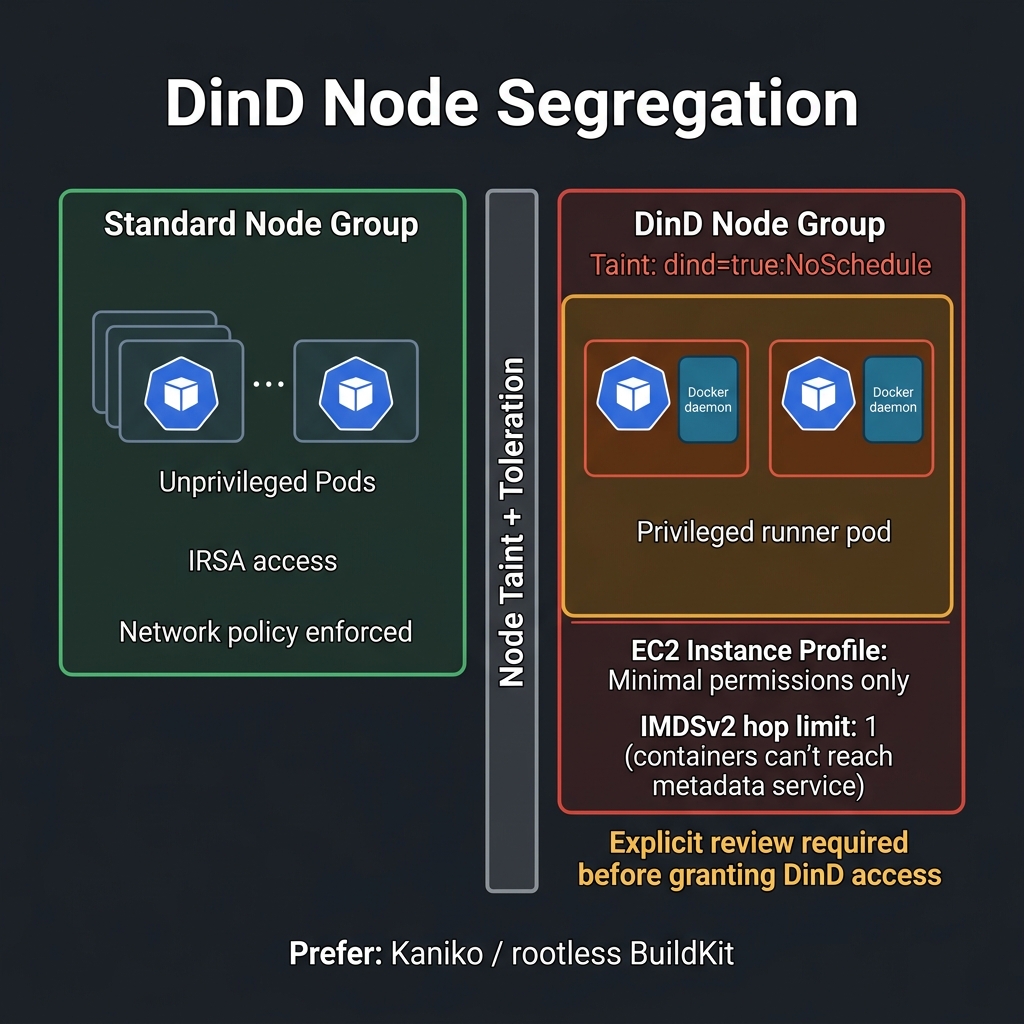
Every platform team eventually hits this: a team needs docker build inside their pipeline. The clean execution mode (fully isolated Kubernetes pods) doesn’t support Docker daemon operations. The tempting fix is DinD — a Docker daemon sidecar — but that sidecar requires a privileged security context, which is effectively root on the node.
DinD isn’t forbidden. But it must be a deliberate, reviewed exception — never the default.
The safeguards:
- DinD pods run exclusively on a dedicated node group with a taint
- That node group’s EC2 instance profile has minimal permissions — no
AssumeRole, no S3, nothing - IMDSv2 hop limit is set to
1so containers cannot reach the metadata service - Access is granted through an explicit review process
The preferred alternative for new pipelines:
# Kaniko — daemonless Docker builds, no privileged container needed
jobs:
  build:
    runs-on: [self-hosted, team-alpha]
    steps:
      - uses: actions/checkout@v4

      - name: Build and push with Kaniko
        run: |
          /kaniko/executor \
            --context=. \
            --dockerfile=Dockerfile \
            --destination=harbor.internal.company.com/team-alpha/myapp:${{ github.sha }} \
            --cache=true \
            --cache-repo=harbor.internal.company.com/team-alpha/myapp-cache

      # Alternative: rootless BuildKit
      - name: Build with BuildKit (rootless)
        run: |
          buildctl build \
            --frontend dockerfile.v0 \
            --local context=. \
            --local dockerfile=. \
            --output type=image,name=harbor.internal.company.com/team-alpha/myapp:${{ github.sha }},push=true
If DinD is unavoidable, the scale set needs the taint toleration and the node selector:
# dind-scaleset-patch.yaml — applied only after explicit review
template:
  spec:
    nodeSelector:
      role: arc-runners-dind      # dedicated node group
    tolerations:
      - key: "dind"
        operator: "Equal"
        value: "true"
        effect: "NoSchedule"
    containers:
      - name: runner
        securityContext:
          privileged: true        # explicit, documented exception
        volumeMounts:
          - name: docker-sock
            mountPath: /var/run/docker.sock
    volumes:
      - name: docker-sock
        emptyDir: {}
Multi-Tenancy: Namespace as the Trust Boundary
A platform serving multiple teams is only as good as its isolation between those teams.
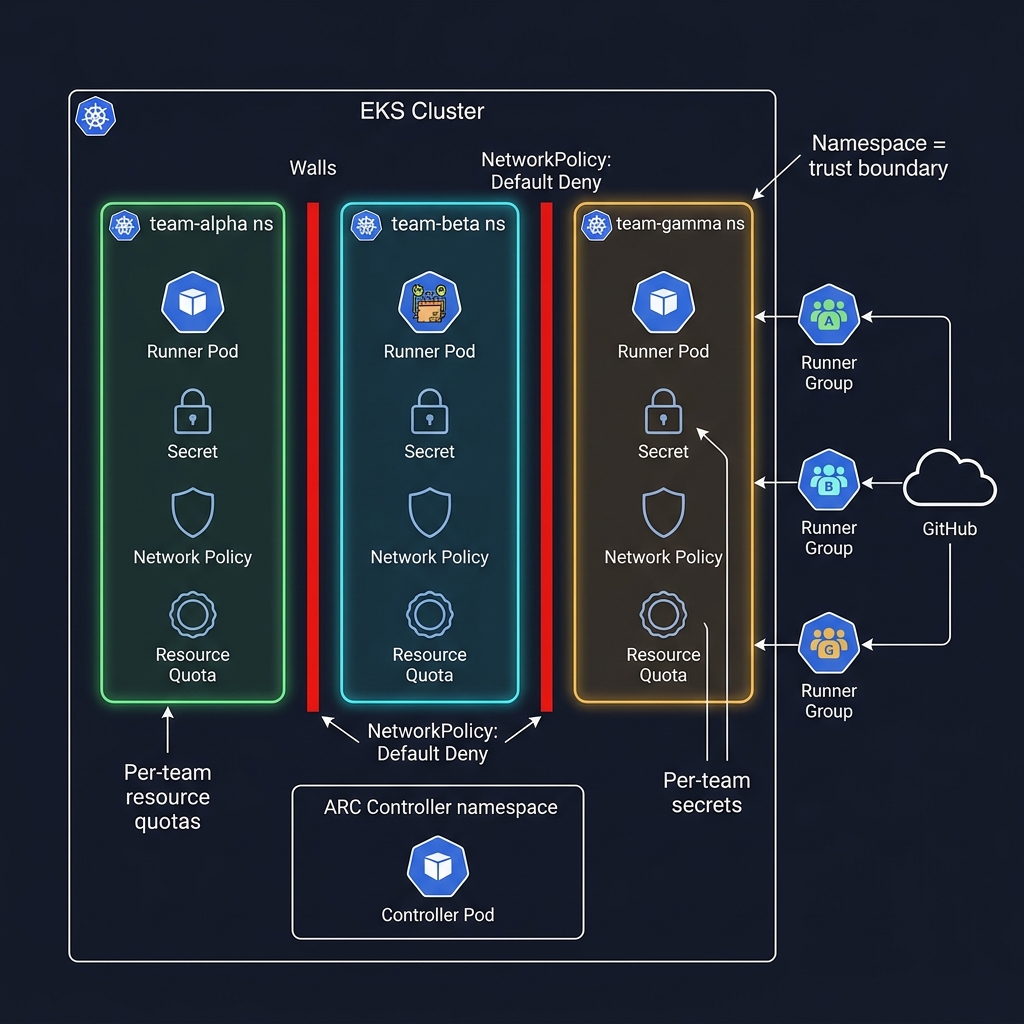
Each consuming team gets a dedicated namespace. That namespace is the complete boundary for everything related to that team’s runners.
Network Policies
# Default deny all — applied to every team namespace
apiVersion: networking.k8s.io/v1
kind: NetworkPolicy
metadata:
  name: default-deny-all
  namespace: team-alpha
spec:
  podSelector: {}
  policyTypes:
    - Ingress
    - Egress
---
# Allow only what team-alpha actually needs
apiVersion: networking.k8s.io/v1
kind: NetworkPolicy
metadata:
  name: runner-egress-allowlist
  namespace: team-alpha
spec:
  podSelector:
    matchLabels:
      app: arc-runner
  policyTypes:
    - Egress
  egress:
    # GitHub API
    - to:
        - ipBlock:
            cidr: 140.82.112.0/20   # GitHub's IP range
      ports:
        - protocol: TCP
          port: 443
    # Internal Harbor registry
    - to:
        - namespaceSelector:
            matchLabels:
              kubernetes.io/metadata.name: harbor
      ports:
        - protocol: TCP
          port: 443
    # DNS
    - to:
        - namespaceSelector:
            matchLabels:
              kubernetes.io/metadata.name: kube-system
      ports:
        - protocol: UDP
          port: 53
Resource Quotas
apiVersion: v1
kind: ResourceQuota
metadata:
  name: runner-quota
  namespace: team-alpha
spec:
  hard:
    # Max concurrent runners × max per-runner resources
    requests.cpu: "40"
    requests.memory: "80Gi"
    limits.cpu: "80"
    limits.memory: "160Gi"
    pods: "25"
    count/secrets: "20"
Admission Policy — Registry Allowlist
Enforced at the Kubernetes admission layer via Kyverno, not just by convention:
apiVersion: kyverno.io/v1
kind: ClusterPolicy
metadata:
  name: restrict-image-registries
spec:
  validationFailureAction: Enforce
  background: true
  rules:
    - name: validate-registries
      match:
        any:
          - resources:
              kinds: [Pod]
      validate:
        message: >
          Only images from harbor.internal.company.com are allowed.
          Received: {{ request.object.spec.containers[].image }}
        pattern:
          spec:
            containers:
              - image: "harbor.internal.company.com/*"
            initContainers:
              - image: "harbor.internal.company.com/*"
Observability: What to Alert On vs. What to Read at Breakfast
ARC exposes Prometheus metrics out of the box. The full metric set:
# HELP gha_runner_scale_set_assigned_job_total Jobs assigned to the scale set
# HELP gha_runner_scale_set_running_job_total  Jobs currently running
# HELP gha_runner_scale_set_registered_runners Runner count currently registered
# HELP gha_runner_scale_set_busy_runners       Runners currently executing a job
# HELP gha_runner_scale_set_min_runners        Configured minRunners
# HELP gha_runner_scale_set_max_runners        Configured maxRunners
All metrics carry namespace and scaleset_name labels — meaning you can build per-team dashboards without separate monitoring stacks.
Prometheus Alert Rules
groups:
  - name: arc-platform
    rules:
      # PAGE: Listener has gone silent — jobs are being dropped
      - alert: ARCListenerSilent
        expr: |
          time() - arc_listener_last_seen_timestamp_seconds > 120
        for: 2m
        labels:
          severity: page
        annotations:
          summary: "ARC listener in {{ $labels.namespace }} has not reported in >2m"
          runbook: "https://wiki.internal/arc/runbooks/listener-silent"

      # PAGE: Controller is crash-looping
      - alert: ARCControllerCrashLoop
        expr: |
          kube_pod_container_status_restarts_total{
            namespace="arc-systems",
            container="manager"
          } > 3
        for: 5m
        labels:
          severity: page

      # WARN: A team's runners are near quota — morning-coffee signal
      - alert: ARCRunnerNearQuota
        expr: |
          gha_runner_scale_set_running_job_total /
          gha_runner_scale_set_max_runners > 0.85
        for: 10m
        labels:
          severity: warning
        annotations:
          summary: "{{ $labels.namespace }} runners at >85% of maxRunners"
CloudTrail Query — Trace a Deployment Back to a Workflow Run
# Find all AssumeRole calls from a specific runner session
aws logs filter-log-events \
  --log-group-name CloudTrail/us-east-1 \
  --filter-pattern '{
    ($.eventName = "AssumeRole") &&
    ($.requestParameters.roleSessionTags[?(@.key == "repository")].value = "my-org/my-repo")
  }' \
  --start-time $(date -d "2026-06-27T00:00:00" +%s000) \
  --query 'events[].message' \
  | jq '.[] | {time: .eventTime, role: .requestParameters.roleArn, session: .requestParameters.roleSessionName, tags: .requestParameters.roleSessionTags}'
Onboarding a New Team: The Contract
A consuming team interacts with the platform through a single Terraform module call. They declare what they need; the platform enforces the guardrails.
# teams/team-alpha/main.tf
module "arc_runner_namespace" {
  source  = "git::https://github.com/my-org/platform-modules.git//arc-runner-namespace?ref=v1.4.2"

  team_name           = "team-alpha"
  github_org          = "my-org"
  github_runner_group = "team-alpha"

  # Resource limits (platform sets the ceiling, team picks within it)
  max_runners         = 20
  runner_cpu_limit    = "4"
  runner_memory_limit = "8Gi"

  # Which team AWS account runners can provision into
  provisioner_role_arn = "arn:aws:iam::999888777666:role/team-alpha-provisioner-role"

  # Egress allowlist — only what the team's workflows actually need
  allowed_egress_cidrs = [
    "10.0.0.0/8",       # internal VPC range
  ]
  allowed_egress_hosts = [
    "github.com",
    "api.github.com",
    "harbor.internal.company.com",
    "registry.terraform.io",
  ]

  # Optional: grant DinD access (triggers security review)
  enable_dind = false
}
The module outputs everything the team needs:
output "runner_label" {
  value = "self-hosted, team-alpha"
  # Use this in runs-on: [self-hosted, team-alpha]
}

output "namespace" {
  value = "team-alpha"
}

output "jump_role_arn" {
  value = module.arc_runner_namespace.jump_role_arn
  # Trust this in your team account's Provisioner Role trust policy
}
What This Costs and What It Buys
| Cost | Benefit |
|---|---|
| Operational burden: EKS, ARC, Vault integration, image mirroring | Security posture is consistent and provable — not aspirational |
| Ongoing: version upgrades, capacity planning, on-call | Compliance audit is a conversation, not a scavenger hunt |
| Upfront: onboarding friction for consuming teams | Capacity is pooled and elastic — teams don’t over-provision siloed runners |
| Build-out time for platform team | One place to look when something goes wrong — not twelve |
For most enterprises running GitHub Actions at any real scale, that trade is worth making. The pain is front-loaded into the platform team’s build-out; the payoff compounds for every team and every workflow that runs on the platform afterward.
Roadmap: What Comes After Day One
The foundation above is enough to run safely for the first wave of teams. What to design for even if you don’t build it yet:
# Multi-region: run ARC in us-east-1 and eu-west-1
# Failover is automatic — listeners in both regions compete for jobs

# Multi-org support: one ARC cluster, multiple GitHub orgs
# Each org gets its own listener deployment and secret set

# Self-service onboarding: teams provision their namespace via PR
# GitHub Actions workflow validates and applies the Terraform module

# Cost attribution: tag every runner pod with team and cost center
# Feed into AWS Cost Explorer for per-team showback
Key Takeaways
The technology stack — ARC, EKS, IRSA, Harbor, Vault — isn’t the hard part. It’s well-documented and battle-tested. The hard part is the discipline:
- Ephemeral by default — no runner survives its job
- No long-lived credentials anywhere in the chain — IRSA or nothing
- No image from anywhere but your own registry — enforced at admission, not by convention
- Isolation boundaries enforced by the system — NetworkPolicy, Kyverno, ResourceQuotas
- Every credential operation leaves a CloudTrail trace — session tags are mandatory
Get the discipline right, and the rest is just infrastructure.
Note
This article is a narrative companion to RFC-001: ARC-Based GitHub Actions Runners as a Platform Service on AWS, which contains the full technical specification, prerequisites, IAM trust policy details, and operational runbook standards referenced throughout.